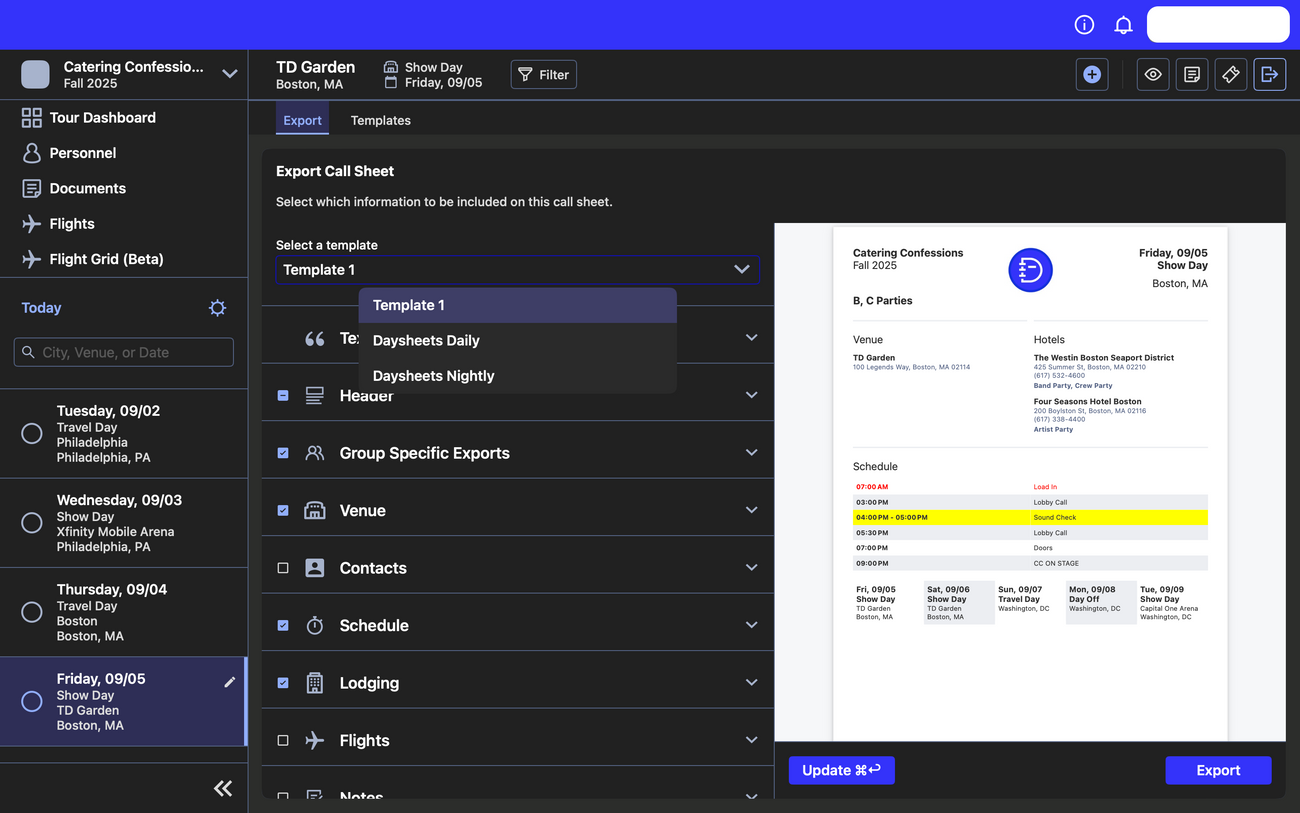
Need to export and print a day sheet? You can take all of the information you have for a day on your tour and export it to a PDF right from Daysheets.To get started, make sure you are clicked in on the day that you would like to use for your export. Then, click on the Export button in the top right corner:From here you can choose exactly what information will be added and how everything will be formatted by opening the drop down menu for each section:The “Text Scaling” section allows you to change the size for each type of text. The button with the larger letter increases the size of the font, the smaller letter decreases the size, and the button with the two arrows will reset any changes:In the “Header” section you can add a logo and position it, and you can also add the forecasted weather:“Group Specific Exports” allows you to customize the day sheet for each group, only showing information relevant to the group(s) that is selected:The “Venue”, “Contacts”, “Schedule”, “Lodging”, “Flights”, “Notes”, and “AftermShow” sections all allow you to customize their sizing and positioning within the call sheet. Use the three alignment buttons to justify a section to the left, right, or center. You can also use the up and down arrows to move sections up and down on the sheet:In the “Schedule” section, you can edit the text on schedule items by bolding and highlighting, making the text red, and increasing or decreasing the size of the font:You can also edit the overview of the next five days at the bottom of the sheet. You can adjust what information is presented as well as the padding between days:Once you’re happy with your day sheet you can click the “Export” button and save it to your computer as a PDF:The Templates feature is great to avoid creating the same formatting every time you need to export a day sheet. To create or edit a template, click on the “Templates” tab:Here you can edit the format of the day sheet exactly like you did initially. However, instead of exporting, choose “Save Template” — be sure to name the template accurately and specifically. The next time you need to export a day sheet, simply choose the template you made from the drop down menu:
⌘I
{"docsConfig":{"theme":"maple","$schema":"https://mintlify.com/docs.json","name":"Daysheets Help Center","description":"Documentation for the Daysheets Mac, iOS, and Android apps.","colors":{"primary":"#0967D2","light":"#0967D2","dark":"#0967D2"},"logo":{"light":"https://mintcdn.com/daysheets-1194227f/utzBPJ2qLiQ5oJWr/logo/light.svg?fit=max\u0026auto=format\u0026n=utzBPJ2qLiQ5oJWr\u0026q=85\u0026s=df8738a198255a4ea604ae2c2086c5ca","dark":"https://mintcdn.com/daysheets-1194227f/utzBPJ2qLiQ5oJWr/logo/dark.svg?fit=max\u0026auto=format\u0026n=utzBPJ2qLiQ5oJWr\u0026q=85\u0026s=64ecd223a33c0c1b41b1ec6a5c20b59d"},"favicon":"/favicon-32x32.png","navbar":{"links":[{"href":"mailto:help@daysheets.com","label":"Email Support"},{"href":"#","label":"Chat with Us"}],"primary":{"type":"button","label":"Book a Demo","href":"/book-a-demo"}},"seo":{"indexing":"all"},"integrations":{"segment":{"key":"AMpjPFqsmoBF6MyQjsRodpajY3sWmevS"}},"styling":{"latex":false},"navigation":{"pages":[]}},"deployment":{"deploymentMetadataValue":{"subdomain":"daysheets-1194227f","hasAudioNarration":false,"actualSubdomain":"daysheets-1194227f","customDomains":["daysheets.com"],"gitSource":{"type":"github","owner":"daysheets","repo":"mintlify","deployBranch":"main","contentDirectory":"","isPrivate":true,"mountPath":"","label":""},"entitlements":{"AI_CHAT":{"status":"ENABLED"},"WEB_MCP":{"status":"ENABLED"},"NARRATION":{"status":"ENABLED"}},"buildId":"6ae93f00453bdad3d9d5531d:success","clientVersion":"0.0.4094","searchFilterCounts":[{"language":"default","tag":"Old Articles","count":42},{"language":"default","tag":"Daysheets Mobile","count":30},{"language":"default","tag":"Daysheets Desktop","count":28},{"language":"default","tag":"Personnel \u0026 Travel Profiles","count":12},{"language":"default","tag":"Additional Guides","count":10},{"language":"default","tag":"Getting Started","count":4},{"language":"default","tag":"Flights","count":4},{"language":"default","tag":"Personnel","count":4},{"language":"default","tag":"Getting started","count":3},{"language":"default","tag":"Schedules","count":2}]},"assistantConfig":{"enableStarterQuestions":true,"deflection":{"enabled":true,"email":"help@daysheets.com","showHelpButton":true}},"basePath":"/docs","hasChatPermissions":true,"hasWebMcpPermissions":true,"toggles":[{"name":"kill-isr","enabled":true,"variant":{"name":"disabled","enabled":false,"feature_enabled":true},"impressionData":false},{"name":"agent-mintlify-slack","enabled":true,"variant":{"name":"disabled","enabled":false,"feature_enabled":true},"impressionData":false},{"name":"agent-integrations-settings","enabled":true,"variant":{"name":"disabled","enabled":false,"feature_enabled":true},"impressionData":false},{"name":"rbac-expansion","enabled":true,"variant":{"name":"disabled","enabled":false,"feature_enabled":true},"impressionData":false},{"name":"automations-pr-grouping","enabled":true,"variant":{"name":"disabled","enabled":false,"feature_enabled":true},"impressionData":false},{"name":"custom-prefix","enabled":true,"variant":{"name":"disabled","enabled":false,"feature_enabled":true},"impressionData":false},{"name":"analytics-v7","enabled":true,"variant":{"name":"disabled","enabled":false,"feature_enabled":true},"impressionData":false},{"name":"user-flows-analytics","enabled":true,"variant":{"name":"disabled","enabled":false,"feature_enabled":true},"impressionData":false},{"name":"no-publish-flow","enabled":true,"variant":{"name":"disabled","enabled":false,"feature_enabled":true},"impressionData":false},{"name":"workos-onboarding","enabled":true,"variant":{"name":"disabled","enabled":false,"feature_enabled":true},"impressionData":false},{"name":"llms-txt-v2","enabled":true,"variant":{"name":"disabled","enabled":false,"feature_enabled":true},"impressionData":false},{"name":"snapshot-serving-live","enabled":true,"variant":{"name":"disabled","enabled":false,"feature_enabled":true},"impressionData":false},{"name":"stripTemperatureMiddleware","enabled":true,"variant":{"name":"disabled","enabled":false,"feature_enabled":true},"impressionData":false},{"name":"support-platform-pylon-zendesk","enabled":true,"variant":{"name":"disabled","enabled":false,"feature_enabled":true},"impressionData":false},{"name":"snapshot-serving","enabled":true,"variant":{"name":"disabled","enabled":false,"feature_enabled":true},"impressionData":false},{"name":"instant-rollback","enabled":true,"variant":{"name":"disabled","enabled":false,"feature_enabled":true},"impressionData":false},{"name":"granular-notifications-server","enabled":true,"variant":{"name":"disabled","enabled":false,"feature_enabled":true},"impressionData":false},{"name":"granular-notifications","enabled":true,"variant":{"name":"disabled","enabled":false,"feature_enabled":true},"impressionData":false},{"name":"automations-fable","enabled":true,"variant":{"name":"disabled","enabled":false,"feature_enabled":true},"impressionData":false},{"name":"fixed-ai-action-pricing","enabled":true,"variant":{"name":"disabled","enabled":false,"feature_enabled":true},"impressionData":false},{"name":"automation-resolve-merge-conflict","enabled":true,"variant":{"name":"disabled","enabled":false,"feature_enabled":true},"impressionData":false},{"name":"scoped-publishing","enabled":true,"variant":{"name":"disabled","enabled":false,"feature_enabled":true},"impressionData":false},{"name":"mintql","enabled":true,"variant":{"name":"disabled","enabled":false,"feature_enabled":true},"impressionData":false},{"name":"page-level-analytics","enabled":true,"variant":{"name":"disabled","enabled":false,"feature_enabled":true},"impressionData":false},{"name":"editor-version-history-v2","enabled":true,"variant":{"name":"disabled","enabled":false,"feature_enabled":true},"impressionData":false},{"name":"billing-page-v2","enabled":true,"variant":{"name":"disabled","enabled":false,"feature_enabled":true},"impressionData":false},{"name":"full-page-search","enabled":true,"variant":{"name":"disabled","enabled":false,"feature_enabled":true},"impressionData":false},{"name":"workspace-projects","enabled":true,"variant":{"name":"disabled","enabled":false,"feature_enabled":true},"impressionData":false},{"name":"assistant-v5","enabled":true,"variant":{"name":"disabled","enabled":false,"feature_enabled":true},"impressionData":false},{"name":"fork-pr-previews","enabled":true,"variant":{"name":"disabled","enabled":false,"feature_enabled":true},"impressionData":false},{"name":"revalidation-jwt","enabled":true,"variant":{"name":"disabled","enabled":false,"feature_enabled":true},"impressionData":false},{"name":"workos-sso-scim","enabled":true,"variant":{"name":"disabled","enabled":false,"feature_enabled":true},"impressionData":false},{"name":"hobby-abuse-scan","enabled":true,"variant":{"name":"disabled","enabled":false,"feature_enabled":true},"impressionData":false},{"name":"dashboard-inbox","enabled":true,"variant":{"name":"disabled","enabled":false,"feature_enabled":true},"impressionData":false},{"name":"workos-signup","enabled":true,"variant":{"name":"disabled","enabled":false,"feature_enabled":true},"impressionData":false},{"name":"turbopuffer-dual-write","enabled":true,"variant":{"name":"disabled","enabled":false,"feature_enabled":true},"impressionData":false},{"name":"workos-enabled","enabled":true,"variant":{"name":"disabled","enabled":false,"feature_enabled":true},"impressionData":false},{"name":"approve-review-flow","enabled":true,"variant":{"name":"disabled","enabled":false,"feature_enabled":true},"impressionData":false},{"name":"editor-metadata","enabled":true,"variant":{"name":"disabled","enabled":false,"feature_enabled":true},"impressionData":false},{"name":"sso-setup-deadline-banner","enabled":true,"variant":{"name":"disabled","enabled":false,"feature_enabled":true},"impressionData":false},{"name":"turbopuffer-serve","enabled":true,"variant":{"name":"disabled","enabled":false,"feature_enabled":true},"impressionData":false},{"name":"live-agents","enabled":true,"variant":{"name":"disabled","enabled":false,"feature_enabled":true},"impressionData":false},{"name":"comment-mode","enabled":true,"variant":{"name":"disabled","enabled":false,"feature_enabled":true},"impressionData":false}],"starterQuestions":[{"_id":"69af400352be5b61c626f1fc","deploymentId":"68bae649ccf0ca7eff05e0bd","questionText":"How do I Add Personnel to My Tour?","status":"active","generatedBy":"manual","createdAt":"2026-03-09T21:47:47.530Z","updatedAt":"2026-03-09T21:47:47.530Z","__v":0},{"_id":"69af3ffb52be5b61c626f1b3","deploymentId":"68bae649ccf0ca7eff05e0bd","questionText":"How do I Create a Tour?","status":"active","generatedBy":"manual","createdAt":"2026-03-09T21:47:39.245Z","updatedAt":"2026-03-09T21:47:39.245Z","__v":0}],"googleFontsInlined":false},"customCss":[],"page":{"pagePath":"pages/general/exporting-daysheets","slug":"/pages/general/exporting-daysheets","pageMetadata":{"title":"Exporting Daysheets","description":"Getting Started with Daysheets","href":"/pages/general/exporting-daysheets","hidden":true},"description":{"compiledSource":"\"use strict\";\nconst {jsx: _jsx} = arguments[0];\nconst {useMDXComponents: _provideComponents} = arguments[0];\nfunction _createMdxContent(props) {\n const _components = {\n p: \"p\",\n ..._provideComponents(),\n ...props.components\n };\n return _jsx(_components.p, {\n children: \"Getting Started with Daysheets\"\n });\n}\nfunction MDXContent(props = {}) {\n const {wrapper: MDXLayout} = {\n ..._provideComponents(),\n ...props.components\n };\n return MDXLayout ? _jsx(MDXLayout, {\n ...props,\n children: _jsx(_createMdxContent, {\n ...props\n })\n }) : _createMdxContent(props);\n}\nreturn {\n default: MDXContent\n};\n","frontmatter":{},"scope":{}},"pageType":"default","mdx":{"mdxSource":{"compiledSource":"\"use strict\";const{Fragment:_Fragment,jsx:_jsx,jsxs:_jsxs}=arguments[0];const{useMDXComponents:_provideComponents}=arguments[0];function _createMdxContent(props){const _components={p:`p`,..._provideComponents(),...props.components},{OptimizedImage}=_components;if(!OptimizedImage)_missingMdxReference(`OptimizedImage`,true);return _jsxs(_Fragment,{children:[_jsx(_components.p,{children:`Need to export and print a day sheet? You can take all of the information you have for a day on your tour and export it to a PDF right from Daysheets.`}),`\n`,_jsx(_components.p,{children:`To get started, make sure you are clicked in on the day that you would like to use for your export. Then, click on the Export button in the top right corner:`}),`\n`,_jsx(OptimizedImage,{src:`https://mintcdn.com/daysheets-1194227f/stMuPNGusI_f0VOr/images/general-guides/exporting-daysheets/export-button.png?fit=max\u0026auto=format\u0026n=stMuPNGusI_f0VOr\u0026q=85\u0026s=7cfbb16ad20f8dbf3cc57e371c9c2a84`,alt:`Main dashboard interface`,height:`300`,className:`mint-rounded-lg`,\"data-og-width\":`1300`,\"data-og-height\":`812`,\"data-path\":`images/general-guides/exporting-daysheets/export-button.png`,\"data-optimize\":`true`,\"data-opv\":`3`,srcset:`https://mintcdn.com/daysheets-1194227f/stMuPNGusI_f0VOr/images/general-guides/exporting-daysheets/export-button.png?w=280\u0026fit=max\u0026auto=format\u0026n=stMuPNGusI_f0VOr\u0026q=85\u0026s=9d9655a4b1bad2a887228d75936ae262 280w, https://mintcdn.com/daysheets-1194227f/stMuPNGusI_f0VOr/images/general-guides/exporting-daysheets/export-button.png?w=560\u0026fit=max\u0026auto=format\u0026n=stMuPNGusI_f0VOr\u0026q=85\u0026s=9c6fbe7e80aa0d151a5294763adf3254 560w, https://mintcdn.com/daysheets-1194227f/stMuPNGusI_f0VOr/images/general-guides/exporting-daysheets/export-button.png?w=840\u0026fit=max\u0026auto=format\u0026n=stMuPNGusI_f0VOr\u0026q=85\u0026s=916923a625997a2700915fb2ed31d5b1 840w, https://mintcdn.com/daysheets-1194227f/stMuPNGusI_f0VOr/images/general-guides/exporting-daysheets/export-button.png?w=1100\u0026fit=max\u0026auto=format\u0026n=stMuPNGusI_f0VOr\u0026q=85\u0026s=03712107fa77a79c0931806503c52086 1100w, https://mintcdn.com/daysheets-1194227f/stMuPNGusI_f0VOr/images/general-guides/exporting-daysheets/export-button.png?w=1650\u0026fit=max\u0026auto=format\u0026n=stMuPNGusI_f0VOr\u0026q=85\u0026s=422e0c153b51e153a396766d9c3d6bd7 1650w, https://mintcdn.com/daysheets-1194227f/stMuPNGusI_f0VOr/images/general-guides/exporting-daysheets/export-button.png?w=2500\u0026fit=max\u0026auto=format\u0026n=stMuPNGusI_f0VOr\u0026q=85\u0026s=764078567b3c54c2f070876ca9f1b058 2500w`}),`\n`,_jsx(_components.p,{children:`From here you can choose exactly what information will be added and how everything will be formatted by opening the drop down menu for each section:`}),`\n`,_jsx(OptimizedImage,{src:`https://mintcdn.com/daysheets-1194227f/stMuPNGusI_f0VOr/images/general-guides/exporting-daysheets/accordian-expand.png?fit=max\u0026auto=format\u0026n=stMuPNGusI_f0VOr\u0026q=85\u0026s=a659f1b0a5200d66986198d6565f424a`,alt:`Main dashboard interface`,height:`300`,className:`mint-rounded-lg`,\"data-og-width\":`1300`,\"data-og-height\":`813`,\"data-path\":`images/general-guides/exporting-daysheets/accordian-expand.png`,\"data-optimize\":`true`,\"data-opv\":`3`,srcset:`https://mintcdn.com/daysheets-1194227f/stMuPNGusI_f0VOr/images/general-guides/exporting-daysheets/accordian-expand.png?w=280\u0026fit=max\u0026auto=format\u0026n=stMuPNGusI_f0VOr\u0026q=85\u0026s=d2b0260d6571d2718b76a63b4f5863f7 280w, https://mintcdn.com/daysheets-1194227f/stMuPNGusI_f0VOr/images/general-guides/exporting-daysheets/accordian-expand.png?w=560\u0026fit=max\u0026auto=format\u0026n=stMuPNGusI_f0VOr\u0026q=85\u0026s=c2767aa718ebf0c0eeead5b6b46b20ee 560w, https://mintcdn.com/daysheets-1194227f/stMuPNGusI_f0VOr/images/general-guides/exporting-daysheets/accordian-expand.png?w=840\u0026fit=max\u0026auto=format\u0026n=stMuPNGusI_f0VOr\u0026q=85\u0026s=bdf150f0ac1ac091f156f1668a3a796c 840w, https://mintcdn.com/daysheets-1194227f/stMuPNGusI_f0VOr/images/general-guides/exporting-daysheets/accordian-expand.png?w=1100\u0026fit=max\u0026auto=format\u0026n=stMuPNGusI_f0VOr\u0026q=85\u0026s=e395abe66ea622eaf91f2d135580d252 1100w, https://mintcdn.com/daysheets-1194227f/stMuPNGusI_f0VOr/images/general-guides/exporting-daysheets/accordian-expand.png?w=1650\u0026fit=max\u0026auto=format\u0026n=stMuPNGusI_f0VOr\u0026q=85\u0026s=66c93ca2c7b49bc00f08ae6b666594f5 1650w, https://mintcdn.com/daysheets-1194227f/stMuPNGusI_f0VOr/images/general-guides/exporting-daysheets/accordian-expand.png?w=2500\u0026fit=max\u0026auto=format\u0026n=stMuPNGusI_f0VOr\u0026q=85\u0026s=5615fe765a380f1d3be726764ccae702 2500w`}),`\n`,_jsx(_components.p,{children:`The “Text Scaling” section allows you to change the size for each type of text. The button with the larger letter increases the size of the font, the smaller letter decreases the size, and the button with the two arrows will reset any changes:`}),`\n`,_jsx(OptimizedImage,{src:`https://mintcdn.com/daysheets-1194227f/stMuPNGusI_f0VOr/images/general-guides/exporting-daysheets/text-adjust.png?fit=max\u0026auto=format\u0026n=stMuPNGusI_f0VOr\u0026q=85\u0026s=aa7ef1481a5030822139d5aff76f46b6`,alt:`Main dashboard interface`,height:`300`,className:`mint-rounded-lg`,\"data-og-width\":`1300`,\"data-og-height\":`814`,\"data-path\":`images/general-guides/exporting-daysheets/text-adjust.png`,\"data-optimize\":`true`,\"data-opv\":`3`,srcset:`https://mintcdn.com/daysheets-1194227f/stMuPNGusI_f0VOr/images/general-guides/exporting-daysheets/text-adjust.png?w=280\u0026fit=max\u0026auto=format\u0026n=stMuPNGusI_f0VOr\u0026q=85\u0026s=c69ff86a77a55c8f3774adb967d8768a 280w, https://mintcdn.com/daysheets-1194227f/stMuPNGusI_f0VOr/images/general-guides/exporting-daysheets/text-adjust.png?w=560\u0026fit=max\u0026auto=format\u0026n=stMuPNGusI_f0VOr\u0026q=85\u0026s=38e000190bc83e215a9041fcc2288163 560w, https://mintcdn.com/daysheets-1194227f/stMuPNGusI_f0VOr/images/general-guides/exporting-daysheets/text-adjust.png?w=840\u0026fit=max\u0026auto=format\u0026n=stMuPNGusI_f0VOr\u0026q=85\u0026s=681d55911c3381db714dd059b1781fea 840w, https://mintcdn.com/daysheets-1194227f/stMuPNGusI_f0VOr/images/general-guides/exporting-daysheets/text-adjust.png?w=1100\u0026fit=max\u0026auto=format\u0026n=stMuPNGusI_f0VOr\u0026q=85\u0026s=22dbe28efda1e4303df4f5bcb55dc613 1100w, https://mintcdn.com/daysheets-1194227f/stMuPNGusI_f0VOr/images/general-guides/exporting-daysheets/text-adjust.png?w=1650\u0026fit=max\u0026auto=format\u0026n=stMuPNGusI_f0VOr\u0026q=85\u0026s=3012ffd8fa2bce9e3e2ae785d581ba80 1650w, https://mintcdn.com/daysheets-1194227f/stMuPNGusI_f0VOr/images/general-guides/exporting-daysheets/text-adjust.png?w=2500\u0026fit=max\u0026auto=format\u0026n=stMuPNGusI_f0VOr\u0026q=85\u0026s=fc7905840a18d81c461c884d41f49c0a 2500w`}),`\n`,_jsx(_components.p,{children:`In the “Header” section you can add a logo and position it, and you can also add the forecasted weather:`}),`\n`,_jsx(OptimizedImage,{src:`https://mintcdn.com/daysheets-1194227f/stMuPNGusI_f0VOr/images/general-guides/exporting-daysheets/logo-weather.png?fit=max\u0026auto=format\u0026n=stMuPNGusI_f0VOr\u0026q=85\u0026s=07933a3bed634a1ac7411bad1c2f295c`,alt:`Main dashboard interface`,height:`300`,className:`mint-rounded-lg`,\"data-og-width\":`1300`,\"data-og-height\":`815`,\"data-path\":`images/general-guides/exporting-daysheets/logo-weather.png`,\"data-optimize\":`true`,\"data-opv\":`3`,srcset:`https://mintcdn.com/daysheets-1194227f/stMuPNGusI_f0VOr/images/general-guides/exporting-daysheets/logo-weather.png?w=280\u0026fit=max\u0026auto=format\u0026n=stMuPNGusI_f0VOr\u0026q=85\u0026s=516241982dacd7f85b2c5539b133200e 280w, https://mintcdn.com/daysheets-1194227f/stMuPNGusI_f0VOr/images/general-guides/exporting-daysheets/logo-weather.png?w=560\u0026fit=max\u0026auto=format\u0026n=stMuPNGusI_f0VOr\u0026q=85\u0026s=d9903724a4682a65de2dd069b0dd251e 560w, https://mintcdn.com/daysheets-1194227f/stMuPNGusI_f0VOr/images/general-guides/exporting-daysheets/logo-weather.png?w=840\u0026fit=max\u0026auto=format\u0026n=stMuPNGusI_f0VOr\u0026q=85\u0026s=9d780d9c4bebf7acf3859850c2864581 840w, https://mintcdn.com/daysheets-1194227f/stMuPNGusI_f0VOr/images/general-guides/exporting-daysheets/logo-weather.png?w=1100\u0026fit=max\u0026auto=format\u0026n=stMuPNGusI_f0VOr\u0026q=85\u0026s=d103b776e7562e3cb9412167e6f84f2f 1100w, https://mintcdn.com/daysheets-1194227f/stMuPNGusI_f0VOr/images/general-guides/exporting-daysheets/logo-weather.png?w=1650\u0026fit=max\u0026auto=format\u0026n=stMuPNGusI_f0VOr\u0026q=85\u0026s=6f8fc52d86ef9880f88210abdf7a1d6b 1650w, https://mintcdn.com/daysheets-1194227f/stMuPNGusI_f0VOr/images/general-guides/exporting-daysheets/logo-weather.png?w=2500\u0026fit=max\u0026auto=format\u0026n=stMuPNGusI_f0VOr\u0026q=85\u0026s=ceded1ec8cd77462ccd1e23d8957c1b2 2500w`}),`\n`,_jsx(_components.p,{children:`“Group Specific Exports” allows you to customize the day sheet for each group, only showing information relevant to the group(s) that is selected:`}),`\n`,_jsx(OptimizedImage,{src:`https://mintcdn.com/daysheets-1194227f/stMuPNGusI_f0VOr/images/general-guides/exporting-daysheets/group-select.png?fit=max\u0026auto=format\u0026n=stMuPNGusI_f0VOr\u0026q=85\u0026s=0f920b47a636e150b00fe3607dceb811`,alt:`Main dashboard interface`,height:`300`,className:`mint-rounded-lg`,\"data-og-width\":`1300`,\"data-og-height\":`812`,\"data-path\":`images/general-guides/exporting-daysheets/group-select.png`,\"data-optimize\":`true`,\"data-opv\":`3`,srcset:`https://mintcdn.com/daysheets-1194227f/stMuPNGusI_f0VOr/images/general-guides/exporting-daysheets/group-select.png?w=280\u0026fit=max\u0026auto=format\u0026n=stMuPNGusI_f0VOr\u0026q=85\u0026s=c6594ab0e945e2004a43b0828140b9e4 280w, https://mintcdn.com/daysheets-1194227f/stMuPNGusI_f0VOr/images/general-guides/exporting-daysheets/group-select.png?w=560\u0026fit=max\u0026auto=format\u0026n=stMuPNGusI_f0VOr\u0026q=85\u0026s=6a8736812a887b9df5d778f19a63223b 560w, https://mintcdn.com/daysheets-1194227f/stMuPNGusI_f0VOr/images/general-guides/exporting-daysheets/group-select.png?w=840\u0026fit=max\u0026auto=format\u0026n=stMuPNGusI_f0VOr\u0026q=85\u0026s=c2daba9060336b40f4e3d09e00011879 840w, https://mintcdn.com/daysheets-1194227f/stMuPNGusI_f0VOr/images/general-guides/exporting-daysheets/group-select.png?w=1100\u0026fit=max\u0026auto=format\u0026n=stMuPNGusI_f0VOr\u0026q=85\u0026s=695ca3785a8e30e21feda9fb246e6037 1100w, https://mintcdn.com/daysheets-1194227f/stMuPNGusI_f0VOr/images/general-guides/exporting-daysheets/group-select.png?w=1650\u0026fit=max\u0026auto=format\u0026n=stMuPNGusI_f0VOr\u0026q=85\u0026s=c0a4e4110e7ddc462987e478e2e63e9a 1650w, https://mintcdn.com/daysheets-1194227f/stMuPNGusI_f0VOr/images/general-guides/exporting-daysheets/group-select.png?w=2500\u0026fit=max\u0026auto=format\u0026n=stMuPNGusI_f0VOr\u0026q=85\u0026s=ead336b93f684c528bcc0c26927b27c4 2500w`}),`\n`,_jsx(_components.p,{children:`The “Venue”, “Contacts”, “Schedule”, “Lodging”, “Flights”, “Notes”, and “AftermShow” sections all allow you to customize their sizing and positioning within the call sheet. Use the three alignment buttons to justify a section to the left, right, or center. You can also use the up and down arrows to move sections up and down on the sheet:`}),`\n`,_jsx(OptimizedImage,{src:`https://mintcdn.com/daysheets-1194227f/stMuPNGusI_f0VOr/images/general-guides/exporting-daysheets/venue-position.png?fit=max\u0026auto=format\u0026n=stMuPNGusI_f0VOr\u0026q=85\u0026s=8beb0d1f840215355bf59af149c7ac86`,alt:`Main dashboard interface`,height:`300`,className:`mint-rounded-lg`,\"data-og-width\":`1300`,\"data-og-height\":`816`,\"data-path\":`images/general-guides/exporting-daysheets/venue-position.png`,\"data-optimize\":`true`,\"data-opv\":`3`,srcset:`https://mintcdn.com/daysheets-1194227f/stMuPNGusI_f0VOr/images/general-guides/exporting-daysheets/venue-position.png?w=280\u0026fit=max\u0026auto=format\u0026n=stMuPNGusI_f0VOr\u0026q=85\u0026s=28a8a5f3f75ee14ebeda247355b19ba8 280w, https://mintcdn.com/daysheets-1194227f/stMuPNGusI_f0VOr/images/general-guides/exporting-daysheets/venue-position.png?w=560\u0026fit=max\u0026auto=format\u0026n=stMuPNGusI_f0VOr\u0026q=85\u0026s=7f5280b623a24af6101f621691d21241 560w, https://mintcdn.com/daysheets-1194227f/stMuPNGusI_f0VOr/images/general-guides/exporting-daysheets/venue-position.png?w=840\u0026fit=max\u0026auto=format\u0026n=stMuPNGusI_f0VOr\u0026q=85\u0026s=f589572db5da9e3a8c77fa3ea12d83cb 840w, https://mintcdn.com/daysheets-1194227f/stMuPNGusI_f0VOr/images/general-guides/exporting-daysheets/venue-position.png?w=1100\u0026fit=max\u0026auto=format\u0026n=stMuPNGusI_f0VOr\u0026q=85\u0026s=d5814b61465c4765ff2395e93b698b24 1100w, https://mintcdn.com/daysheets-1194227f/stMuPNGusI_f0VOr/images/general-guides/exporting-daysheets/venue-position.png?w=1650\u0026fit=max\u0026auto=format\u0026n=stMuPNGusI_f0VOr\u0026q=85\u0026s=1e019dd6e034dd5a1ef3d6beabc647eb 1650w, https://mintcdn.com/daysheets-1194227f/stMuPNGusI_f0VOr/images/general-guides/exporting-daysheets/venue-position.png?w=2500\u0026fit=max\u0026auto=format\u0026n=stMuPNGusI_f0VOr\u0026q=85\u0026s=5333f48f98a0171fb2a41c9daa79239b 2500w`}),`\n`,_jsx(_components.p,{children:`In the “Schedule” section, you can edit the text on schedule items by bolding and highlighting, making the text red, and increasing or decreasing the size of the font:`}),`\n`,_jsx(OptimizedImage,{src:`https://mintcdn.com/daysheets-1194227f/stMuPNGusI_f0VOr/images/general-guides/exporting-daysheets/format-adjust.png?fit=max\u0026auto=format\u0026n=stMuPNGusI_f0VOr\u0026q=85\u0026s=196f6d807a74a3b2eff656084f3c3b75`,alt:`Main dashboard interface`,height:`300`,className:`mint-rounded-lg`,\"data-og-width\":`1300`,\"data-og-height\":`813`,\"data-path\":`images/general-guides/exporting-daysheets/format-adjust.png`,\"data-optimize\":`true`,\"data-opv\":`3`,srcset:`https://mintcdn.com/daysheets-1194227f/stMuPNGusI_f0VOr/images/general-guides/exporting-daysheets/format-adjust.png?w=280\u0026fit=max\u0026auto=format\u0026n=stMuPNGusI_f0VOr\u0026q=85\u0026s=3f2a34318a9e73a3855cbb126c2a2b9d 280w, https://mintcdn.com/daysheets-1194227f/stMuPNGusI_f0VOr/images/general-guides/exporting-daysheets/format-adjust.png?w=560\u0026fit=max\u0026auto=format\u0026n=stMuPNGusI_f0VOr\u0026q=85\u0026s=07ecc194bca9a8eebea30cf8555f1387 560w, https://mintcdn.com/daysheets-1194227f/stMuPNGusI_f0VOr/images/general-guides/exporting-daysheets/format-adjust.png?w=840\u0026fit=max\u0026auto=format\u0026n=stMuPNGusI_f0VOr\u0026q=85\u0026s=3b1beb472354ab0411dc8c272b469c92 840w, https://mintcdn.com/daysheets-1194227f/stMuPNGusI_f0VOr/images/general-guides/exporting-daysheets/format-adjust.png?w=1100\u0026fit=max\u0026auto=format\u0026n=stMuPNGusI_f0VOr\u0026q=85\u0026s=0c8690a15f6a96118fbf26f9e6b169a8 1100w, https://mintcdn.com/daysheets-1194227f/stMuPNGusI_f0VOr/images/general-guides/exporting-daysheets/format-adjust.png?w=1650\u0026fit=max\u0026auto=format\u0026n=stMuPNGusI_f0VOr\u0026q=85\u0026s=349eb8eff04a41fae3acd506b3f71664 1650w, https://mintcdn.com/daysheets-1194227f/stMuPNGusI_f0VOr/images/general-guides/exporting-daysheets/format-adjust.png?w=2500\u0026fit=max\u0026auto=format\u0026n=stMuPNGusI_f0VOr\u0026q=85\u0026s=ee213f7d53b03cdb613a79ec2d2742e8 2500w`}),`\n`,_jsx(_components.p,{children:`You can also edit the overview of the next five days at the bottom of the sheet. You can adjust what information is presented as well as the padding between days:`}),`\n`,_jsx(OptimizedImage,{src:`https://mintcdn.com/daysheets-1194227f/stMuPNGusI_f0VOr/images/general-guides/exporting-daysheets/padding-adjust.png?fit=max\u0026auto=format\u0026n=stMuPNGusI_f0VOr\u0026q=85\u0026s=68f32d14497a665d6c6626249743f48c`,alt:`Main dashboard interface`,height:`300`,className:`mint-rounded-lg`,\"data-og-width\":`1300`,\"data-og-height\":`814`,\"data-path\":`images/general-guides/exporting-daysheets/padding-adjust.png`,\"data-optimize\":`true`,\"data-opv\":`3`,srcset:`https://mintcdn.com/daysheets-1194227f/stMuPNGusI_f0VOr/images/general-guides/exporting-daysheets/padding-adjust.png?w=280\u0026fit=max\u0026auto=format\u0026n=stMuPNGusI_f0VOr\u0026q=85\u0026s=81afae626d2584c20ed1f7caaa2d67f5 280w, https://mintcdn.com/daysheets-1194227f/stMuPNGusI_f0VOr/images/general-guides/exporting-daysheets/padding-adjust.png?w=560\u0026fit=max\u0026auto=format\u0026n=stMuPNGusI_f0VOr\u0026q=85\u0026s=3a910d2ce59c1c4acd556db9a027e1b3 560w, https://mintcdn.com/daysheets-1194227f/stMuPNGusI_f0VOr/images/general-guides/exporting-daysheets/padding-adjust.png?w=840\u0026fit=max\u0026auto=format\u0026n=stMuPNGusI_f0VOr\u0026q=85\u0026s=94d2f23baa3062789f844b5c4f20b499 840w, https://mintcdn.com/daysheets-1194227f/stMuPNGusI_f0VOr/images/general-guides/exporting-daysheets/padding-adjust.png?w=1100\u0026fit=max\u0026auto=format\u0026n=stMuPNGusI_f0VOr\u0026q=85\u0026s=533ce122ff17bdda03d05bbee1f4b04a 1100w, https://mintcdn.com/daysheets-1194227f/stMuPNGusI_f0VOr/images/general-guides/exporting-daysheets/padding-adjust.png?w=1650\u0026fit=max\u0026auto=format\u0026n=stMuPNGusI_f0VOr\u0026q=85\u0026s=ee70bfe90eb97e6fbf5516fe6966d6a2 1650w, https://mintcdn.com/daysheets-1194227f/stMuPNGusI_f0VOr/images/general-guides/exporting-daysheets/padding-adjust.png?w=2500\u0026fit=max\u0026auto=format\u0026n=stMuPNGusI_f0VOr\u0026q=85\u0026s=0c36a217fbd1927e1a89a2bddca5c337 2500w`}),`\n`,_jsx(_components.p,{children:`Once you’re happy with your day sheet you can click the “Export” button and save it to your computer as a PDF:`}),`\n`,_jsx(OptimizedImage,{src:`https://mintcdn.com/daysheets-1194227f/stMuPNGusI_f0VOr/images/general-guides/exporting-daysheets/export-to-comp.png?fit=max\u0026auto=format\u0026n=stMuPNGusI_f0VOr\u0026q=85\u0026s=a80de4380792acb5563c647192f89c4a`,alt:`Main dashboard interface`,height:`300`,className:`mint-rounded-lg`,\"data-og-width\":`1300`,\"data-og-height\":`814`,\"data-path\":`images/general-guides/exporting-daysheets/export-to-comp.png`,\"data-optimize\":`true`,\"data-opv\":`3`,srcset:`https://mintcdn.com/daysheets-1194227f/stMuPNGusI_f0VOr/images/general-guides/exporting-daysheets/export-to-comp.png?w=280\u0026fit=max\u0026auto=format\u0026n=stMuPNGusI_f0VOr\u0026q=85\u0026s=624c6ff90b5e21b98f508e70482d729b 280w, https://mintcdn.com/daysheets-1194227f/stMuPNGusI_f0VOr/images/general-guides/exporting-daysheets/export-to-comp.png?w=560\u0026fit=max\u0026auto=format\u0026n=stMuPNGusI_f0VOr\u0026q=85\u0026s=a7dfa25fff4b8be4a8f765155a01ff14 560w, https://mintcdn.com/daysheets-1194227f/stMuPNGusI_f0VOr/images/general-guides/exporting-daysheets/export-to-comp.png?w=840\u0026fit=max\u0026auto=format\u0026n=stMuPNGusI_f0VOr\u0026q=85\u0026s=b6ef7ef4b126aa83ff6af913d0d82a45 840w, https://mintcdn.com/daysheets-1194227f/stMuPNGusI_f0VOr/images/general-guides/exporting-daysheets/export-to-comp.png?w=1100\u0026fit=max\u0026auto=format\u0026n=stMuPNGusI_f0VOr\u0026q=85\u0026s=2cacaaf4171b339d8c3c134edcda8cab 1100w, https://mintcdn.com/daysheets-1194227f/stMuPNGusI_f0VOr/images/general-guides/exporting-daysheets/export-to-comp.png?w=1650\u0026fit=max\u0026auto=format\u0026n=stMuPNGusI_f0VOr\u0026q=85\u0026s=5db3e480abdca4080b361cf7d1b3a603 1650w, https://mintcdn.com/daysheets-1194227f/stMuPNGusI_f0VOr/images/general-guides/exporting-daysheets/export-to-comp.png?w=2500\u0026fit=max\u0026auto=format\u0026n=stMuPNGusI_f0VOr\u0026q=85\u0026s=9bfa86a37a960d2c77ee69e79ce14383 2500w`}),`\n`,_jsx(_components.p,{children:`The Templates feature is great to avoid creating the same formatting every time you need to export a day sheet. To create or edit a template, click on the “Templates” tab:`}),`\n`,_jsx(OptimizedImage,{src:`https://mintcdn.com/daysheets-1194227f/stMuPNGusI_f0VOr/images/general-guides/exporting-daysheets/templates-tab.png?fit=max\u0026auto=format\u0026n=stMuPNGusI_f0VOr\u0026q=85\u0026s=0bc7bfd766a657b579fe9821fad36313`,alt:`Main dashboard interface`,height:`300`,className:`mint-rounded-lg`,\"data-og-width\":`1300`,\"data-og-height\":`815`,\"data-path\":`images/general-guides/exporting-daysheets/templates-tab.png`,\"data-optimize\":`true`,\"data-opv\":`3`,srcset:`https://mintcdn.com/daysheets-1194227f/stMuPNGusI_f0VOr/images/general-guides/exporting-daysheets/templates-tab.png?w=280\u0026fit=max\u0026auto=format\u0026n=stMuPNGusI_f0VOr\u0026q=85\u0026s=2f16b6e244e3bbed1583810c9593d4f9 280w, https://mintcdn.com/daysheets-1194227f/stMuPNGusI_f0VOr/images/general-guides/exporting-daysheets/templates-tab.png?w=560\u0026fit=max\u0026auto=format\u0026n=stMuPNGusI_f0VOr\u0026q=85\u0026s=853287380ac72ed0cdba9beccb70ea42 560w, https://mintcdn.com/daysheets-1194227f/stMuPNGusI_f0VOr/images/general-guides/exporting-daysheets/templates-tab.png?w=840\u0026fit=max\u0026auto=format\u0026n=stMuPNGusI_f0VOr\u0026q=85\u0026s=8a623ca5fe578f7d544e074a7499b196 840w, https://mintcdn.com/daysheets-1194227f/stMuPNGusI_f0VOr/images/general-guides/exporting-daysheets/templates-tab.png?w=1100\u0026fit=max\u0026auto=format\u0026n=stMuPNGusI_f0VOr\u0026q=85\u0026s=1d6b2f082ee79b8fa23c2f206ef65bf6 1100w, https://mintcdn.com/daysheets-1194227f/stMuPNGusI_f0VOr/images/general-guides/exporting-daysheets/templates-tab.png?w=1650\u0026fit=max\u0026auto=format\u0026n=stMuPNGusI_f0VOr\u0026q=85\u0026s=c48936dd8cc181c2bcd60543a5aca516 1650w, https://mintcdn.com/daysheets-1194227f/stMuPNGusI_f0VOr/images/general-guides/exporting-daysheets/templates-tab.png?w=2500\u0026fit=max\u0026auto=format\u0026n=stMuPNGusI_f0VOr\u0026q=85\u0026s=7c7fc9033fd8915fb6438579d0f99f6f 2500w`}),`\n`,_jsx(_components.p,{children:`Here you can edit the format of the day sheet exactly like you did initially. However, instead of exporting, choose “Save Template” — be sure to name the template accurately and specifically. The next time you need to export a day sheet, simply choose the template you made from the drop down menu:`}),`\n`,_jsx(OptimizedImage,{src:`https://mintcdn.com/daysheets-1194227f/stMuPNGusI_f0VOr/images/general-guides/exporting-daysheets/template-name.png?fit=max\u0026auto=format\u0026n=stMuPNGusI_f0VOr\u0026q=85\u0026s=210a7518a92e54167d807da6518dd783`,alt:`Main dashboard interface`,height:`300`,className:`mint-rounded-lg`,\"data-og-width\":`1300`,\"data-og-height\":`813`,\"data-path\":`images/general-guides/exporting-daysheets/template-name.png`,\"data-optimize\":`true`,\"data-opv\":`3`,srcset:`https://mintcdn.com/daysheets-1194227f/stMuPNGusI_f0VOr/images/general-guides/exporting-daysheets/template-name.png?w=280\u0026fit=max\u0026auto=format\u0026n=stMuPNGusI_f0VOr\u0026q=85\u0026s=12a569acc6fe19a12558b97981b9b0ba 280w, https://mintcdn.com/daysheets-1194227f/stMuPNGusI_f0VOr/images/general-guides/exporting-daysheets/template-name.png?w=560\u0026fit=max\u0026auto=format\u0026n=stMuPNGusI_f0VOr\u0026q=85\u0026s=d6745010c1be01e98281fb1f8666d166 560w, https://mintcdn.com/daysheets-1194227f/stMuPNGusI_f0VOr/images/general-guides/exporting-daysheets/template-name.png?w=840\u0026fit=max\u0026auto=format\u0026n=stMuPNGusI_f0VOr\u0026q=85\u0026s=c72dd784c456953e24832713fbfcc7e3 840w, https://mintcdn.com/daysheets-1194227f/stMuPNGusI_f0VOr/images/general-guides/exporting-daysheets/template-name.png?w=1100\u0026fit=max\u0026auto=format\u0026n=stMuPNGusI_f0VOr\u0026q=85\u0026s=94d0b9a65677bb3dc6058ae87608f8d4 1100w, https://mintcdn.com/daysheets-1194227f/stMuPNGusI_f0VOr/images/general-guides/exporting-daysheets/template-name.png?w=1650\u0026fit=max\u0026auto=format\u0026n=stMuPNGusI_f0VOr\u0026q=85\u0026s=2f6f83558b408b8903b20dd278b25386 1650w, https://mintcdn.com/daysheets-1194227f/stMuPNGusI_f0VOr/images/general-guides/exporting-daysheets/template-name.png?w=2500\u0026fit=max\u0026auto=format\u0026n=stMuPNGusI_f0VOr\u0026q=85\u0026s=df90a1869faa6ad211b0176a8aae950f 2500w`})]})}function MDXContent(props={}){const{wrapper:MDXLayout}={..._provideComponents(),...props.components};return MDXLayout?_jsx(MDXLayout,{...props,children:_jsx(_createMdxContent,{...props})}):_createMdxContent(props)}return{default:MDXContent};function _missingMdxReference(id,component){throw new Error(`Expected `+(component?`component`:`object`)+\" `\"+id+\"` to be defined: you likely forgot to import, pass, or provide it.\")}","frontmatter":{},"scope":{"config":{},"pageMetadata":{"title":"Exporting Daysheets","description":"Getting Started with Daysheets","href":"/pages/general/exporting-daysheets","hidden":true}}},"mdxSourceWithNoJs":null},"mdxExtracts":{"tableOfContents":[],"codeExamples":{}},"jsLinks":["/docs/_mintlify/custom/daysheets-1194227f/2e1cb1b453908b16/atlas.js"],"dynamicCss":".mint-rounded-lg {\n border-radius: 0.5rem\n}","subdomain":"daysheets-1194227f","siteName":"Daysheets Help Center","title":"Exporting Daysheets - Daysheets Help Center","navMaps":{"firstHrefInVersion":{},"firstHrefInLanguage":{}},"lastModified":"2026-01-29T00:17:00.087Z","originalFileLocation":"pages/general/exporting-daysheets.mdx"},"headHtml":"\u003cscript data-mint-head>(function(){var d=document.documentElement,p=null;if(!p){try{p=localStorage.getItem(\"isDarkMode\")}catch(e){}if(p==='true')p='dark';else if(p==='false')p='light';if(p!=='light'\u0026\u0026p!=='dark'\u0026\u0026p!=='system')p=\"system\"}var r=p==='system'?(matchMedia(\"(prefers-color-scheme: dark)\").matches?'dark':'light'):p;d.classList.remove(r==='dark'?'light':'dark');d.classList.add(r);d.setAttribute(\"data-theme-preference\",p)})();\u003c/script>\u003cmeta data-mint-head name=\"description\" content=\"Getting Started with Daysheets\">\u003cmeta data-mint-head name=\"application-name\" content=\"Daysheets Help Center\">\u003cmeta data-mint-head name=\"generator\" content=\"Mintlify\">\u003clink data-mint-head rel=\"icon\" type=\"image/png\" sizes=\"192x192\" href=\"/docs/mintlify-assets/_mintlify/favicons/daysheets-1194227f/R_5YlwYanELNS5t2/_generated/favicon/android-chrome-192x192.png\" media=\"(prefers-color-scheme: light)\">\u003clink data-mint-head rel=\"apple-touch-icon\" type=\"image/png\" sizes=\"180x180\" href=\"/docs/mintlify-assets/_mintlify/favicons/daysheets-1194227f/R_5YlwYanELNS5t2/_generated/favicon/apple-touch-icon.png\">\u003clink data-mint-head rel=\"icon\" type=\"image/png\" sizes=\"16x16\" href=\"/docs/mintlify-assets/_mintlify/favicons/daysheets-1194227f/R_5YlwYanELNS5t2/_generated/favicon/favicon-16x16.png\" media=\"(prefers-color-scheme: light)\">\u003clink data-mint-head rel=\"icon\" type=\"image/png\" sizes=\"32x32\" href=\"/docs/mintlify-assets/_mintlify/favicons/daysheets-1194227f/R_5YlwYanELNS5t2/_generated/favicon/favicon-32x32.png\" media=\"(prefers-color-scheme: light)\">\u003clink data-mint-head rel=\"shortcut icon\" type=\"image/x-icon\" href=\"/docs/mintlify-assets/_mintlify/favicons/daysheets-1194227f/R_5YlwYanELNS5t2/_generated/favicon/favicon.ico\" media=\"(prefers-color-scheme: light)\">\u003clink data-mint-head rel=\"icon\" type=\"image/png\" sizes=\"192x192\" href=\"/docs/mintlify-assets/_mintlify/favicons/daysheets-1194227f/R_5YlwYanELNS5t2/_generated/favicon-dark/android-chrome-192x192.png\" media=\"(prefers-color-scheme: dark)\">\u003clink data-mint-head rel=\"icon\" type=\"image/png\" sizes=\"16x16\" href=\"/docs/mintlify-assets/_mintlify/favicons/daysheets-1194227f/R_5YlwYanELNS5t2/_generated/favicon-dark/favicon-16x16.png\" media=\"(prefers-color-scheme: dark)\">\u003clink data-mint-head rel=\"icon\" type=\"image/png\" sizes=\"32x32\" href=\"/docs/mintlify-assets/_mintlify/favicons/daysheets-1194227f/R_5YlwYanELNS5t2/_generated/favicon-dark/favicon-32x32.png\" media=\"(prefers-color-scheme: dark)\">\u003clink data-mint-head rel=\"shortcut icon\" type=\"image/x-icon\" href=\"/docs/mintlify-assets/_mintlify/favicons/daysheets-1194227f/R_5YlwYanELNS5t2/_generated/favicon-dark/favicon.ico\" media=\"(prefers-color-scheme: dark)\">\u003cmeta data-mint-head property=\"og:title\" content=\"Exporting Daysheets - Daysheets Help Center\">\u003cmeta data-mint-head property=\"og:description\" content=\"Getting Started with Daysheets\">\u003cmeta data-mint-head property=\"og:site_name\" content=\"Daysheets Help Center\">\u003cmeta data-mint-head property=\"og:url\" content=\"https://daysheets.com/docs/pages/general/exporting-daysheets\">\u003cmeta data-mint-head property=\"og:type\" content=\"website\">\u003cmeta data-mint-head property=\"og:image\" content=\"https://daysheets-1194227f.mintlify.site/docs/_mintlify/api/og/v2?division=Old+Articles\u0026amp;title=Exporting+Daysheets\u0026amp;description=Getting+Started+with+Daysheets\u0026amp;theme=5fef1e64b4a1aae930d5ed65\u0026amp;signature=108f2764c06830d372f411f840454e3392deaa575b3fffedabd784e91934b8db\">\u003cmeta data-mint-head property=\"og:image:width\" content=\"1200\">\u003cmeta data-mint-head property=\"og:image:height\" content=\"630\">\u003cmeta data-mint-head name=\"twitter:card\" content=\"summary_large_image\">\u003cmeta data-mint-head name=\"twitter:title\" content=\"Exporting Daysheets - Daysheets Help Center\">\u003cmeta data-mint-head name=\"twitter:description\" content=\"Getting Started with Daysheets\">\u003cmeta data-mint-head name=\"twitter:image\" content=\"https://daysheets-1194227f.mintlify.site/docs/_mintlify/api/og/v2?division=Old+Articles\u0026amp;title=Exporting+Daysheets\u0026amp;description=Getting+Started+with+Daysheets\u0026amp;theme=5fef1e64b4a1aae930d5ed65\u0026amp;signature=108f2764c06830d372f411f840454e3392deaa575b3fffedabd784e91934b8db\">\u003cmeta data-mint-head name=\"twitter:image:width\" content=\"1200\">\u003cmeta data-mint-head name=\"twitter:image:height\" content=\"630\">\u003cmeta data-mint-head name=\"msapplication-config\" content=\"/docs/mintlify-assets/_mintlify/favicons/daysheets-1194227f/R_5YlwYanELNS5t2/_generated/favicon/browserconfig.xml\">\u003cmeta data-mint-head name=\"apple-mobile-web-app-title\" content=\"Daysheets Help Center\">\u003cmeta data-mint-head name=\"msapplication-TileColor\" content=\"#0967D2\">\u003clink data-mint-head rel=\"canonical\" href=\"https://daysheets.com/docs/pages/general/exporting-daysheets\">\u003clink data-mint-head rel=\"alternate\" type=\"application/xml\" href=\"/docs/sitemap.xml\">\u003clink data-mint-head rel=\"alternate\" type=\"text/markdown\" href=\"/docs/pages/general/exporting-daysheets.md\">\u003cscript data-mint-head type=\"application/ld+json\">{\"@context\":\"https://schema.org\",\"@graph\":[{\"@type\":\"Organization\",\"@id\":\"https://daysheets.com/#organization\",\"name\":\"Daysheets Help Center\",\"url\":\"https://daysheets.com\",\"logo\":{\"@type\":\"ImageObject\",\"url\":\"https://mintcdn.com/daysheets-1194227f/utzBPJ2qLiQ5oJWr/logo/light.svg?fit=max\u0026auto=format\u0026n=utzBPJ2qLiQ5oJWr\u0026q=85\u0026s=df8738a198255a4ea604ae2c2086c5ca\"}},{\"@type\":\"WebSite\",\"@id\":\"https://daysheets.com/docs#website\",\"name\":\"Daysheets Help Center\",\"url\":\"https://daysheets.com/docs\",\"publisher\":{\"@id\":\"https://daysheets.com/#organization\"}},{\"@type\":\"WebPage\",\"@id\":\"https://daysheets.com/docs/pages/general/exporting-daysheets#webpage\",\"url\":\"https://daysheets.com/docs/pages/general/exporting-daysheets\",\"name\":\"Exporting Daysheets\",\"description\":\"Getting Started with Daysheets\",\"dateModified\":\"2026-01-29T00:17:00.087Z\",\"isPartOf\":{\"@id\":\"https://daysheets.com/docs#website\"},\"breadcrumb\":{\"@id\":\"https://daysheets.com/docs/pages/general/exporting-daysheets#breadcrumb\"}},{\"@type\":\"BreadcrumbList\",\"@id\":\"https://daysheets.com/docs/pages/general/exporting-daysheets#breadcrumb\",\"itemListElement\":[{\"@type\":\"ListItem\",\"position\":1,\"name\":\"Old Articles\",\"item\":\"https://daysheets.com/docs/pages/getting-started/download-daysheets\"},{\"@type\":\"ListItem\",\"position\":2,\"name\":\"Exporting Daysheets\",\"item\":\"https://daysheets.com/docs/pages/general/exporting-daysheets\"}]},{\"@type\":[\"Article\",\"TechArticle\"],\"@id\":\"https://daysheets.com/docs/pages/general/exporting-daysheets#article\",\"headline\":\"Exporting Daysheets\",\"name\":\"Exporting Daysheets\",\"description\":\"Getting Started with Daysheets\",\"url\":\"https://daysheets.com/docs/pages/general/exporting-daysheets\",\"mainEntityOfPage\":{\"@id\":\"https://daysheets.com/docs/pages/general/exporting-daysheets#webpage\"},\"dateModified\":\"2026-01-29T00:17:00.087Z\",\"publisher\":{\"@id\":\"https://daysheets.com/#organization\"},\"isPartOf\":{\"@id\":\"https://daysheets.com/docs#website\"}}]}\u003c/script>\u003cscript data-mint-head type=\"application/ld+json\">{\"@context\":\"https://schema.org\",\"@type\":\"WebSite\",\"name\":\"Daysheets Help Center\",\"creator\":{\"@type\":\"Organization\",\"name\":\"Mintlify\",\"url\":\"https://mintlify.com\"}}\u003c/script>","siteName":"Daysheets Help Center","nav":{"global":null,"products":[{"product":"Daysheets Desktop","pages":[{"title":"Daysheets Desktop","href":"/daysheets-core/daysheets-desktop/getting-started/introduction"}]},{"product":"Daysheets Mobile","pages":[{"title":"Daysheets Mobile","href":"/first-user-experience/mobile"}]},{"product":"Old Articles","hidden":true,"pages":[{"group":"Old Articles","pages":[{"group":"Getting started","pages":[{"title":"Download Daysheets","description":"Getting Started with Daysheets","href":"/pages/getting-started/download-daysheets"},{"title":"Creating an account","description":"Getting Started with Daysheets","href":"/pages/getting-started/create-account"},{"title":"Creating a tour","description":"Getting Started with Daysheets","href":"/pages/getting-started/create-tour"}]},{"title":"Sending Push Notifications","description":"Getting Started with Daysheets","href":"/pages/general/notifications"},{"title":"Exporting Daysheets","href":"/pages/general/exporting-daysheets"},{"title":"Setting Up Calendar Feeds","description":"Getting Started with Daysheets","href":"/pages/general/calendar-feeds"},{"title":"Importing Flights with Daysheets AI","description":"Getting Started with Daysheets","href":"/pages/events-reservations/import-flights"},{"title":"Daily Schedules","description":"Getting Started with Daysheets","href":"/pages/events-reservations/schedules"},{"title":"Transfers and Grids","description":"Getting Started with Daysheets","href":"/pages/events-reservations/transfers"},{"group":"Personnel \u0026 Travel Profiles","pages":[{"title":"Personnel Overview","description":"Getting Started with Daysheets","href":"/pages/personnel/personnel-overview"},{"title":"Creating Groups","description":"Getting Started with Daysheets","href":"/pages/personnel/creating-groups"},{"title":"Personnel Overview","description":"Getting Started with Daysheets","href":"/pages/personnel/adding-personnel"},{"title":"Importing Personnel","description":"Getting Started with Daysheets","href":"/pages/personnel/importing-personnel"},{"title":"Understanding Connections and Profiles","description":"Getting Started with Daysheets","href":"/pages/personnel/connections"},{"title":"Viewing Personnel Details","description":"Getting Started with Daysheets","href":"/pages/personnel/viewing-personnel"},{"title":"Adjusting Permissions \u0026 Visibility","description":"Getting Started with Daysheets","href":"/pages/personnel/permissions-visibility"},{"title":"Inviting Personnel to Daysheets","description":"Getting Started with Daysheets","href":"/pages/personnel/inviting-personnel"},{"title":"Requesting Travel Profiles","description":"Getting Started with Daysheets","href":"/pages/personnel/requesting-profiles"},{"title":"Sharing Your Travel Profiles","description":"Getting Started with Daysheets","href":"/pages/personnel/sharing-profiles"},{"title":"How Daysheets Protects Your Data","description":"Getting Started with Daysheets","href":"/pages/personnel/daysheets-data"},{"title":"Disconnecting \u0026 Reconnecting with Personnel","description":"Getting Started with Daysheets","href":"/pages/personnel/disconnecting"}]}]}]}]},"basePath":"","title":"Exporting Daysheets - Daysheets Help Center","buildId":"dpl_3pZeXn3XukjzFRgAX73A7GNDfRJ1","deploymentId":"dpl_3pZeXn3XukjzFRgAX73A7GNDfRJ1","dynamics":["a74be98ba7"],"chunks":["zoom-image-lightbox-g3ZzIKzc.js","lightbox-handle-r17bVUz3.js"]}