
Two Cities, One Day. Two Schedules in One Tour Management App.
When your band rehearses in Nashville and your crew techs the show in the UK, the right tour management app keeps both schedules straight on the same date.

By Ben Melman
Founder & CEO
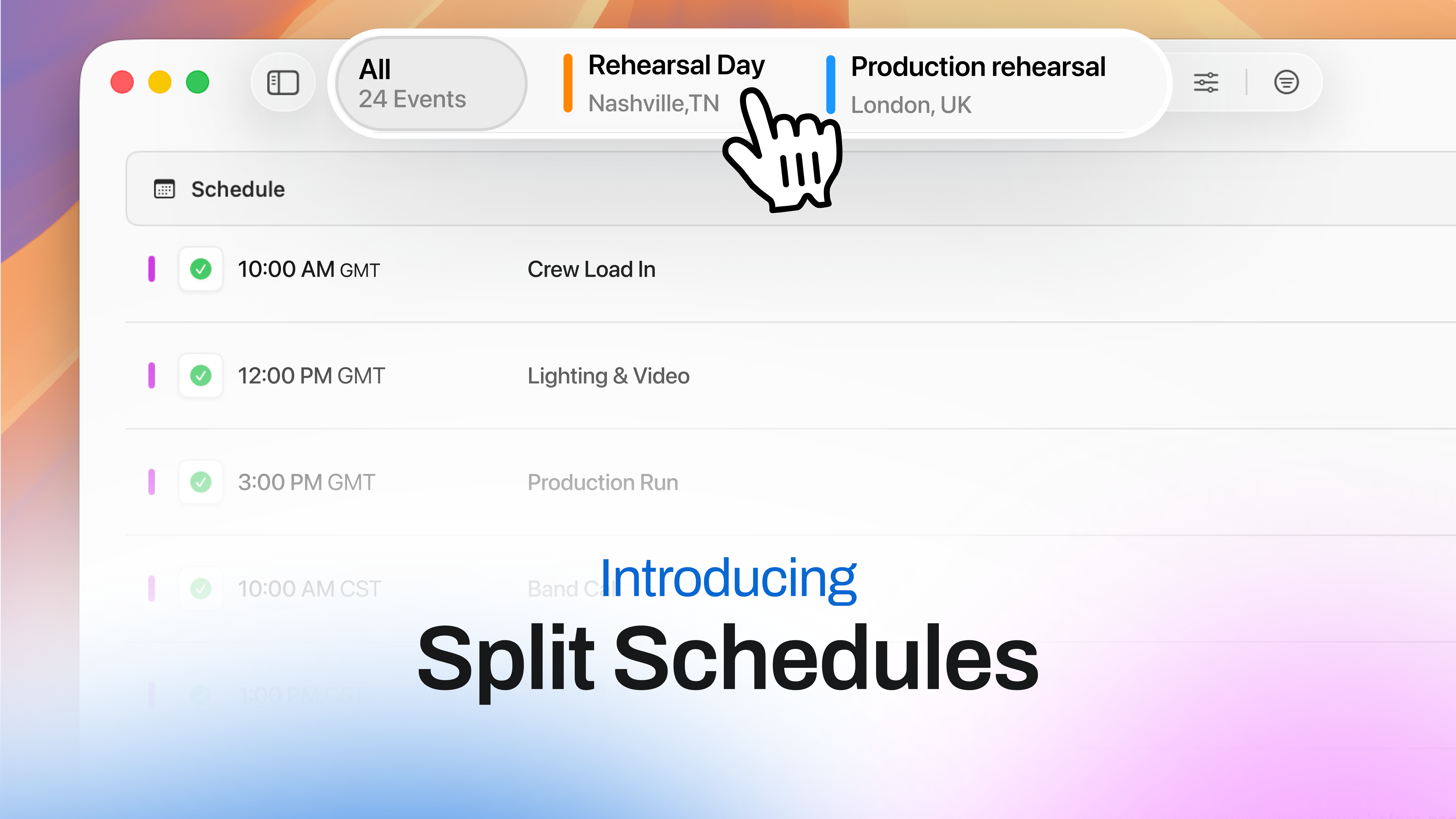
There's a stretch before every big tour where your touring party isn't really one tour. It's two or three, running in parallel, in different cities, sometimes on different continents. Your band is in a rehearsal space somewhere getting the set tight. Your production crew is at an arena-sized rehearsal facility building the show, prepping video, programming lighting, gearing up for the the load in they'll repeat show after show. It's the same week, same calendar date, but completely different days.
Most tour management apps choke on this. A calendar entry is a calendar entry, and a single day sheet wants a single location, a single set of call times, a single time zone. So you end up running two tours on Master Tour, or compile two spreadsheets and hope you can keep everything straight. The right tour management app shouldn't make you do that. This post is about a feature in Daysheets that doesn't: tagging individual events with a day type, so one date can hold two full schedules, each filtered to the right party, each in its own time zone, automatically.
If you've already read how Multiday lets each group see only their part of the day, this is the next layer down.
Why one day on tour isn't always one schedule
The rehearsal period is the clearest example, but it's not the only one. Any time your parties physically split, the "one day = one schedule" model breaks.
Think about a normal travel split. Your C Party loads out after a show and drives overnight to the next market to make an early load-in. Your A and B Party may not fly until the next morning, so theyre in the city where the crew just loaded out. On the calendar that's one date. On the ground it's a load-in day in one city and a travel day in another, hundreds of miles apart, in possibly different time zones.
Or festival runs, where the artist plays a one-off while the crew is already onto the next fly date, or a press day in Los Angeles for the artist while the crew has a day off. The pattern is the same: the date is shared, the day is not.
Rehearsals and steel days push it to the extreme. You're not splitting one schedule into two versions of the same day. You're running two genuinely separate operations that happen to share a square on the calendar.
Want to see how group filtering works first? Explore how Multiday personalizes each party's view →
Why do I need two schedules for band rehearsals and production rehearsals?
Band rehearsals are the band in a room locking the setlist, arrangements, and transitions until the music is tight. Production rehearsals are the full show: lighting, video, automation, set assembly and teardown, wardrobe, and everyone's cues, run at an production-capabable facility so the entire crew can tech it before opening night.
This isn't a Daysheets distinction; it's how touring works. The band goes into a rehearsal space to figure out the setlist and get the tunes tight, and then there are the production rehearsals, which involve the show itself and practicing the teardown and assembly of the set. For major acts, production rehearsals can run literally weeks, because a show with sound, lighting, video, moving stages, and wardrobe changes needs that long to come together.
The two often don't happen in the same place, or sometimes, even the same country. PRG alone runs production rehearsal studios in Nashville, Los Angeles, and Longbridge, England. So a setup where your A and B Party are in Nashville getting the set ready while your crew is in the UK teching production is not a corner case anyone invented to sell software. It's Tuesday.
The scheduling problem is that those two operations need to land on the same dates in your routing without contaminating each other. Your lighting director in England does not need the band's Nashville call. Your musical director does not need the UK truck-pack schedule. And nobody should be doing time-zone math at 2am to figure out whether "10am rehearsal" means Central or GMT.
How event tagging by day type works
Daysheets already lets you build a date with more than one day type on it. You can put a Rehearsal day type tied to Nashville and a separate Production Rehearsal day type tied to the UK on the same square in your routing. (If you're new to building routing, day types and locations are the first thing you set up when you create a tour.)
The new piece is what happens at the event level. Now you can tag each event on the schedule to one of those day types. Add a 10am band call and tag it to the Nashville rehearsal. Add a 9am crew call and tag it to the UK production rehearsal. The two stacks of events live on the same date but belong to different day types, which means you've effectively built two separate schedules in one place.
In practice it looks like this:
- Add both day types to the date. One Rehearsal in Nashville, one Production Rehearsal in the UK, each with its own location.
- Build each schedule and tag the events. As you add calls, soundchecks, meals, and notes, tag each one to the day type it belongs to.
- Let the filtering do the rest. Each event now shows up under its own day type, so the date reads as two clean schedules instead of one jumbled list.
That's the whole workflow. The point isn't that it's clever; it's that it matches how the day actually runs, so you stop translating between the tool and reality.
Time zones and parties, handled automatically
Two things happen the moment you tag an event to a day type, and they're the reason this is worth the feature rather than a workaround.
The time zone sets itself from the day type's location. Tag an event to the Nashville rehearsal and it's on Central time. Tag one to the UK production rehearsal and it's on GMT. You enter the local time you mean, and the app holds the right zone behind it. No mental conversion, no "wait, is that their morning or ours," no event quietly landing six hours off on someone's phone.
The event inherits the parties tied to that day type. If your Rehearsal day type is associated with your A and B Party, every event you tag to it is automatically visible to A and B and hidden from everyone else. Tag to the Production Rehearsal day type and the crew gets it instead. You're not hand-picking visibility event by event. You set the association once on the day type, and tagging an event to it carries the audience along.
Put together: tag an event, and its time zone and its audience are already correct. That's the difference between a tour management app that understands a split day and a calendar that just lets you type two things in one box.
Build split-schedule days without the spreadsheet gymnastics. See how Daysheets handles Multiday and event tagging →
When it's time to send the schedules out, the same logic carries through to your PDFs. Because each event already knows its day type and party, your group-specific exports come out clean: the band gets the Nashville sheet, the crew gets the UK sheet, both pulled from the same date in the same tour.
When you'd actually use this
You don't need event tagging for a 5 in a van. If everyone's in the same city doing the same day, a single schedule is right and you should leave it alone.
Reach for it when the parties genuinely split:
- Rehearsal periods where band and production prep in different cities or countries.
- Advance crew loading into tomorrow's venue while the artist has a day off somewhere else.
- Festival routing where the artist plays a one-off and the crew is already on the next fly date.
- Press or promo days in one market while the rest of the party works a different schedule entirely.
- Any date that crosses time zones, where getting the call times right used to mean doing the math yourself.
The setup cost is a couple of extra minutes per split date. The payoff is that nobody on your tour sees a call that isn't theirs, nobody's phone shows the wrong time zone, and you stop being the human reconciliation layer between two schedules.
Conclusion
The hardest days to schedule have never been the show days. They're the ones where your tour quietly becomes two tours: the rehearsal weeks, the travel splits, the advance days. Legacy tools pretend it's still one, or hack it together to make it two. Tagging events by day type lines the app up with what's really happening: two schedules on one date, each in its own time zone, each visible only to the party that needs it. You build it once, and the band in Nashville and the crew in the UK each get a day sheet that looks like someone made it just for them. Because you made it for them, and stayed on top of everything for yourself.
Ready to run your next rehearsal period without juggling two tours? Start your free Daysheets trial and build a split-schedule day in minutes.